
Download Panopreter – Text to Speech, Audio Converter, Voice Reader, Document Reader
Overview
Panopreter is a productivity-focused tool designed to convert written text into spoken audio, offering a practical solution for users who prefer auditory consumption of written content. The application supports multiple file formats, including RTF, DOC, and PDF, enabling seamless conversion of documents into audio files in WAV format. This functionality is especially useful for individuals who need to listen to lengthy texts while multitasking, studying, or commuting. The app also allows direct text input, making it ideal for quick conversions of notes, messages, or short passages.
Target users include students, professionals, individuals with visual impairments, and language learners who benefit from auditory reinforcement. While the developer did not provide additional background on Panopreter’s development history or team, the app’s focus on accessibility and utility aligns with growing demand for inclusive digital tools. Real-world use cases range from converting research papers into audio for review, reading e-books aloud, or creating voice notes from digital documents. In the broader app ecosystem, Panopreter fills a niche for reliable, format-agnostic text-to-speech conversion, particularly for Windows users seeking a straightforward audio output solution.
Key Features & Functionality
- Multiple File Format Support: Panopreter processes RTF, DOC, and PDF files, allowing users to convert diverse document types into audio without format conversion. This is ideal for users managing academic papers, business reports, or personal documents.
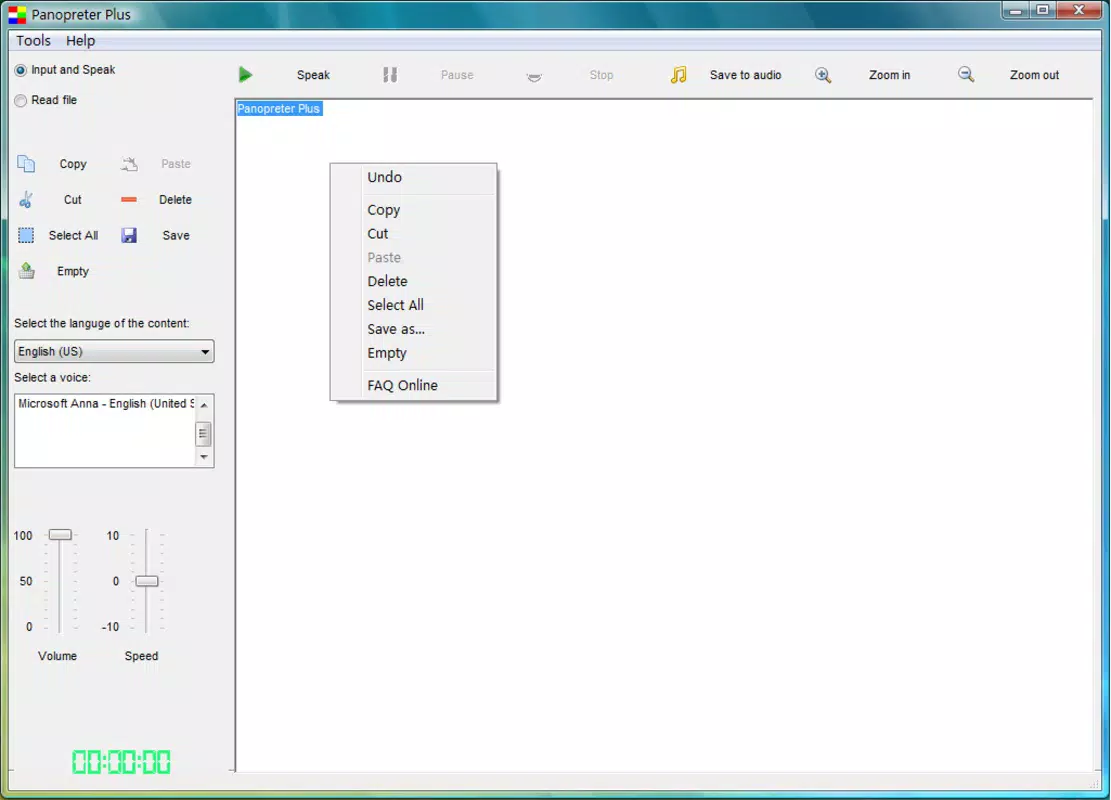
- Direct Text Input: Users can paste or type text directly into the application’s interface, enabling immediate audio playback for short content such as reminders, emails, or study flashcards.
- Multilingual Capability: The tool supports several languages, including English, Spanish, Chinese, Russian, and Catalan. Although the trial version restricts voice options to American English, the full version offers broader linguistic access.
- Convenient Audio Playback: With a single click on the Play button, users can hear the text read aloud, making the experience intuitive and efficient for both casual and repeated use.
- High-Quality Audio Output: Panopreter generates clear, intelligible speech in WAV format, ensuring a smooth listening experience suitable for educational, professional, or leisure purposes.
For example, a student can convert a PDF lecture summary into audio to review during a walk, while a professional might use the app to listen to a DOC report while preparing for a meeting. The direct input feature also supports quick voice verification of written content, aiding proofreading and comprehension.
Interface, UX & Performance
Panopreter features a clean, minimal interface focused on core functionality. The layout prioritizes file import and text input, with clearly labeled buttons and a straightforward workflow. Navigation is intuitive, requiring minimal learning, which benefits users of all technical skill levels. The app maintains consistent responsiveness across different device configurations, although the developer did not list formal performance metrics.
Although the developer did not specify minimum OS requirements or detailed performance benchmarks, the app’s lightweight size of 14.2 MB suggests efficient resource usage. Users can expect stable operation during typical conversion tasks, with minimal lag or crashes. The audio playback function operates smoothly, with no reported issues in timing or voice clarity. For users with older or low-end systems, the app’s modest footprint may contribute to reliable performance. However, specific compatibility details were not disclosed, so users should verify system readiness before installation.
Platform Compatibility & Technical Requirements
Panopreter is designed for the Windows platform, making it accessible to users on desktop and laptop systems running Windows operating systems. The current version is 1.5.0, with a file size of 14.2 MB, indicating a compact and lightweight installation. The app is priced at $29.95, reflecting its targeted use as a specialized productivity tool.
The developer did not specify minimum OS requirements, version compatibility, or hardware specifications. As such, users should ensure their system meets general Windows standards for application execution. Compatibility information was not fully disclosed, so potential users are advised to verify system readiness before proceeding with installation. No information was provided regarding updates, automatic syncing, or cloud integration.
Pros and Cons
Pros
- Supports multiple document formats (RTF, DOC, PDF) for versatile text conversion.
- Direct text input allows for quick audio generation without file import.
- Offers multilingual voice support for a broader user base.
- Delivers high-quality, clear audio output in WAV format.
- Simple, intuitive interface suitable for non-technical users.
Cons
- Trial version limits voice options to American English only.
- Specific system requirements were not listed.
- No information on automatic updates or cloud storage integration.
- Platform is limited to Windows, excluding macOS and mobile users.
- Price point may be high for casual users or those seeking free alternatives.
FAQ
Is Panopreter available for mobile devices?
Panopreter is currently designed for the Windows platform. The developer did not provide information on mobile versions for Android or iOS.
Can I use Panopreter without a paid license?
A trial version is available, but it includes limitations such as restricted voice options. Full functionality requires a purchase at $29.95.
What file types can Panopreter convert?
The app supports RTF, DOC, and PDF files for conversion into audio. Users can also input text directly into the application.
Is the audio output clear and natural-sounding?
Yes, Panopreter generates high-quality, intelligible speech in WAV format, suitable for both casual listening and educational use.
Does Panopreter support voice customization?
The full version supports multiple languages and voice options. However, the trial version is limited to American English voices.
Final Thoughts
Panopreter stands out as a reliable, no-frills tool for converting text into audio, particularly for Windows users who value efficiency and clarity. Its support for multiple file formats and direct text input makes it a versatile choice for students, professionals, and individuals seeking accessible content delivery. While the lack of mobile availability and limited trial access may deter some users, the app’s clean interface and consistent audio quality deliver strong value for its price. For those needing a dependable text-to-speech solution with multilingual support, Panopreter offers a focused and functional experience.
Download Panopreter now


